Ciel's blog

Hi, this is Ciel!

Reference

C# Tutorial (C Sharp) (w3schools.com)

Get started

  • C# is an object-oriented programming language created by Microsoft that runs on the .NET Framework.

  • The first version was released in year 2002. The latest version, C# 12, was released in November 2023.

  • 两种运行cs程序的方式:

    1. VS 中

      How to run C# project: How to run a program (C#) - Visual Studio (Windows) | Microsoft Learn

    2. csproj 目录下运行dotnet run

      How to run C# project in VS Code: [How to Run C# in VSCode (and Compile, Debug, and Create a Project) (travis.media)](https://travis.media/how-to-run-csharp-in-vscode/#:~:text=How to Run C%23 in VSCode 1 1.,Your Code To compile your code%2C run%3A )

      1
      2
      3
      4
      5
      6
      7
      8
      # create a C# project
      dotnet new console -o app
      cd app
      code . # to open project in VSCode
      # run
      dotnote run
      # generate executable file
      dotnet buid

C# Syntax

1
2
3
4
5
6
7
8
9
10
11
12
using System;

namespace HelloWorld
{
class Program
{
static void Main(string[] args)
{
Console.WriteLine("Hello World!");
}
}
}
  • using System means that we can use classes from the System namespace.

  • namespace is used to organize your code, and it is a container for classes and other namespaces.

  • class is a container for data and methods, which brings functionality to your program. Every line of code that runs in C# must be inside a class. In our example, we named the class Program.

  • Console is a class of the System namespace, which has a WriteLine() method that is used to output/print text. In our example, it will output “Hello World!”.

    If you omit the using System line, you would have to write System.Console.WriteLine() to print/output text.

  • Unlike Java, the name of the C# file does not have to match the class name, but they often do (for better organization).

1
2
3
4
5
6
7
8
9
10
11
12
13
14
15
16
17
18
19
20
21
22
23
24
25
26
27
28
29
30
31
32
33
34
35
36
37
38
39
40
41
// ========== Output ==========
Console.WriteLine("Hello World!");
// no new line
Console.Write("Hello World! ");

// ========== Variables ==========
// variable types
int myNum = 5; // Integer (whole number)
double myDoubleNum = 5.99D; // Floating point number
char myLetter = 'D'; // Character
bool myBool = true; // Boolean
string myText = "Hello"; // String
// assign value later
int myNum;
myNum = 15;
/* If you don't want others (or yourself) to overwrite existing values, you can add the const keyword in front of the variable type.*/
// A const field requires a value to be provided.
const int myNum = 15;
// To combine both text and a variable, use the + character:
string name = "John";
Console.WriteLine("Hello " + name);
// numeric values
int x = 5;
int y = 6;
Console.WriteLine(x + y); // Print the value of x + y
// To declare more than one variable of the same type, use a comma-separated list:
int x = 5, y = 6, z = 50;
// or
int x, y, z;
x = y = z = 50;

// ========== Data Types ==========
// Which type you should use, depends on the numeric value.
// Note that you should end the value with an "L":
long myNum = 15000000000L;
// Note that you should end the value with an "F" for floats and "D" for doubles:
float myNum = 5.75F;
double myNum = 19.99D;
// Scientific Numbers
float f1 = 35e3F;
double d1 = 12E4D;
Data Type Size Description
int 4 bytes Stores whole numbers from -2,147,483,648 to 2,147,483,647
long 8 bytes Stores whole numbers from -9,223,372,036,854,775,808 to 9,223,372,036,854,775,807
float 4 bytes Stores fractional numbers. Sufficient for storing 6 to 7 decimal digits
double 8 bytes Stores fractional numbers. Sufficient for storing 15 decimal digits
bool 1 bit Stores true or false values
char 2 bytes Stores a single character/letter, surrounded by single quotes
string 2 bytes per character Stores a sequence of characters, surrounded by double quotes
1
2
3
4
5
6
7
8
9
10
11
12
13
14
15
16
17
18
19
20
21
22
23
24
25
26
// ========== Type Casting ==========
// Implicit Casting (automatically) - converting a smaller type to a larger type size:
char -> int -> long -> float -> double
// Explicit Casting (manually) - converting a larger type to a smaller size type
double -> float -> long -> int -> char

double myDouble = 9.78;
int myInt = (int) myDouble;

// Type Conversion Methods
// It is also possible to convert data types explicitly by using built-in methods, such as Convert.ToBoolean, Convert.ToDouble, Convert.ToString, Convert.ToInt32 (int) and Convert.ToInt64 (long):
int myInt = 10;
double myDouble = 5.25;
bool myBool = true;

Console.WriteLine(Convert.ToString(myInt)); // convert int to string
Console.WriteLine(Convert.ToDouble(myInt)); // convert int to double
Console.WriteLine(Convert.ToInt32(myDouble)); // convert double to int
Console.WriteLine(Convert.ToString(myBool)); // convert bool to string

// ========== Input ==========
Console.WriteLine("Enter your age:");
int age = Convert.ToInt32(Console.ReadLine());
Console.WriteLine("Your age is: " + age);

// ========== Operators ==========
Operator Name Description Example
+ Addition Adds together two values x + y
- Subtraction Subtracts one value from another x - y
* Multiplication Multiplies two values x * y
/ Division Divides one value by another x / y
% Modulus Returns the division remainder x % y
++ Increment Increases the value of a variable by 1 x++
Decrement Decreases the value of a variable by 1 x–
Operator Example Same As
= x = 5 x = 5
+= x += 3 x = x + 3
-= x -= 3 x = x - 3
*= x *= 3 x = x * 3
/= x /= 3 x = x / 3
%= x %= 3 x = x % 3
&= x &= 3 x = x & 3
|= x |= 3 x = x | 3
^= x ^= 3 x = x ^ 3
>>= x >>= 3 (移位,/2) x = x >> 3
<<= *x <<= 3 (移位,2) x = x << 3
Operator Name Example
== Equal to x == y
!= Not equal x != y
> Greater than x > y
< Less than x < y
>= Greater than or equal to x >= y
<= Less than or equal to x <= y
Operator Name Description Example
&& Logical and Returns True if both statements are true x < 5 && x < 10
|| Logical or Returns True if one of the statements is true x < 5 || x < 4
! Logical not Reverse the result, returns False if the result is true !(x < 5 && x < 10)
1
2
3
4
5
6
7
8
9
10
11
12
13
14
15
16
17
18
19
20
21
22
23
24
25
26
27
28
29
30
31
32
33
34
35
36
37
38
39
40
41
42
43
44
45
46
47
48
// ========== Math ==========
Math.Max(5, 10);
Math.Min(5, 10);
Math.Sqrt(64);
Math.Abs(-4.7);
Math.Round(9.99);

// ========== Strings ==========
string txt = "ABCDEFGHIJKLMNOPQRSTUVWXYZ";
Console.WriteLine("The length of the txt string is: " + txt.Length);

string txt = "Hello World";
Console.WriteLine(txt.ToUpper()); // Outputs "HELLO WORLD"
Console.WriteLine(txt.ToLower()); // Outputs "hello world"

// Concatenation
string firstName = "John ";
string lastName = "Doe";
string name = firstName + lastName;
// string name = string.Concat(firstName, lastName);
Console.WriteLine(name);

string x = "10";
string y = "20";
string z = x + y; // z will be 1020 (a string)

// Interpolation
// note that you have to use the dollar sign ($) when using the string interpolation method.
string firstName = "John";
string lastName = "Doe";
string name = $"My full name is: {firstName} {lastName}";
Console.WriteLine(name);

// Access Strings
string myString = "Hello";
Console.WriteLine(myString[0]); // Outputs "H"
Console.WriteLine(myString.IndexOf("e")); // Outputs "1"

// Full name
string name = "John Doe";

// Location of the letter D
int charPos = name.IndexOf("D");
// Get last name
string lastName = name.Substring(charPos);
// Print the result
Console.WriteLine(lastName);
// Special Characters
Escape character Result Description
' Single quote
" Double quote
\ \ Backslash
Code Result
\n New Line
\t Tab
\b Backspace
1
2
3
4
5
6
7
8
9
10
11
12
13
14
15
16
17
18
19
20
21
22
23
24
25
26
27
28
29
30
31
32
33
34
35
36
37
38
39
40
41
42
43
44
45
46
47
48
49
50
51
52
53
54
55
56
57
58
59
60
61
62
63
64
65
66
67
68
69
70
71
72
73
74
75
76
77
78
79
80
81
82
83
84
85
86
87
88
89
90
91
92
93
94
95
96
97
98
99
100
101
102
103
104
105
106
107
108
109
110
111
112
113
114
115
116
117
118
119
120
121
122
123
124
125
126
127
128
129
130
131
132
133
134
135
136
137
138
139
140
141
142
143
144
145
146
147
// ========== IF...Else ==========
/*
Use if to specify a block of code to be executed, if a specified condition is true
Use else to specify a block of code to be executed, if the same condition is false
Use else if to specify a new condition to test, if the first condition is false
Use switch to specify many alternative blocks of code to be executed
*/
if (condition1)
{
// block of code to be executed if condition1 is True
}
else if (condition2)
{
// block of code to be executed if the condition1 is false and condition2 is True
}
else
{
// block of code to be executed if the condition1 is false and condition2 is False
}

// short hand if-else
int time = 20;
string result = (time < 18) ? "Good day." : "Good evening.";
Console.WriteLine(result);

// ========== Switch ==========
switch(expression)
{
case x:
// code block
break;
case y:
// code block
break;
// The default keyword is optional and specifies some code to run if there is no case match:
default:
// code block
break;
}

// ========== While ==========
while (condition)
{
// code block to be executed
}

// This loop will execute the code block once, before checking if the condition is true
do
{
// code block to be executed
}
while (condition);

// ========== For loop ==========
// Outer loop
for (int i = 1; i <= 2; ++i)
{
Console.WriteLine("Outer: " + i); // Executes 2 times

// Inner loop
for (int j = 1; j <= 3; j++)
{
Console.WriteLine(" Inner: " + j); // Executes 6 times (2 * 3)
}
}

// Foreach Loop
string[] cars = {"Volvo", "BMW", "Ford", "Mazda"};
foreach (string i in cars)
{
Console.WriteLine(i);
}

// ========== Break and Continue ==========
// The break statement can also be used to jump out of a loop.
// The continue statement breaks one iteration (in the loop), if a specified condition occurs, and continues with the next iteration in the loop.
// This example skips the value of 4:
for (int i = 0; i < 10; i++)
{
if (i == 4)
{
continue;
}
Console.WriteLine(i);
}

// ========== Arrays ==========
string[] cars = {"Volvo", "BMW", "Ford", "Mazda"};
cars[0] = "Opel";
Console.WriteLine(cars[0]);
// Now outputs Opel instead of Volvo
Console.WriteLine(cars.Length);

// different ways to create an array
// Create an array of four elements, and add values later
string[] cars = new string[4];
// Create an array of four elements and add values right away
string[] cars = new string[4] {"Volvo", "BMW", "Ford", "Mazda"};
// Create an array of four elements without specifying the size
string[] cars = new string[] {"Volvo", "BMW", "Ford", "Mazda"};
// Create an array of four elements, omitting the new keyword, and without specifying the size
// we will often use the last option, as it is faster and easier to read.
string[] cars = {"Volvo", "BMW", "Ford", "Mazda"};
// However, you should note that if you declare an array and initialize it later, you have to use the new keyword

// Loop Through Arrays
string[] cars = {"Volvo", "BMW", "Ford", "Mazda"};
for (int i = 0; i < cars.Length; i++)
{
Console.WriteLine(cars[i]);
}

foreach (string i in cars)
{
Console.WriteLine(i);
}

// Sort a string
string[] cars = {"Volvo", "BMW", "Ford", "Mazda"};
Array.Sort(cars);
foreach (string i in cars)
{
Console.WriteLine(i);
}

int[] myNumbers = {5, 1, 8, 9};
Console.WriteLine(myNumbers.Max()); // returns the largest value
Console.WriteLine(myNumbers.Min()); // returns the smallest value
Console.WriteLine(myNumbers.Sum()); // returns the sum of elements

// Multidimensional Arrays
int[,] numbers = { {1, 4, 2}, {3, 6, 8} };

// access
int[,] numbers = { {1, 4, 2}, {3, 6, 8} };
Console.WriteLine(numbers[0, 2]); // Outputs 2

// note that we have to use GetLength() instead of Length to specify how many times the loop should run
int[,] numbers = { {1, 4, 2}, {3, 6, 8} };

for (int i = 0; i < numbers.GetLength(0); i++)
{
for (int j = 0; j < numbers.GetLength(1); j++)
{
Console.WriteLine(numbers[i, j]);
}
}
img

C# Methods

A method is a block of code which only runs when it is called.

You can pass data, known as parameters, into a method.

Methods are used to perform certain actions, and they are also known as functions.

Why use methods? To reuse code: define the code once, and use it many times.

In C#, it is good practice to start with an uppercase letter when naming methods, as it makes the code easier to read.

1
2
3
4
5
6
7
8
9
10
11
12
13
// It is also possible to send arguments with the key: value syntax.
// That way, the order of the arguments does not matter:
static void MyMethod(string child1, string child2, string child3)
{
Console.WriteLine("The youngest child is: " + child3);
}

static void Main(string[] args)
{
MyMethod(child3: "John", child1: "Liam", child2: "Liam");
}

// The youngest child is: John

Method Overloading 重载

With method overloading, multiple methods can have the same name with different parameters:

1
2
3
4
5
6
7
public class Calculator
{
public int Add(int a, int b) => a + b;
public int Add(int a, int b, int c) => a + b +c;
public double Add(double a, double b) => a + b;
public double Add(double a, double b, double c) => a + b + c;
}

Multiple methods can have the same name as long as the number and/or type of parameters are different.

Method Overriding 重写

notes is from Overloading Vs. Overriding in C# | HackerNoon

Overriding, on the other hand, is the ability to redefine the implementation of a method in a class that inherits from a parent class. When a method is overridden, the name and the parameters stay the same, but the implementation that gets called depends on the type of the object that’s calling it.

Overriding is known as runtime (or dynamic) polymorphism because the type of the calling object is not known until runtime, and therefore the method implementation that runs is determined at runtime.

As an example, imagine we have a base class called Dog with a Woof method. We mark the method as virtual to signify that this method can be overriden by inheriting classes.

1
2
3
4
5
6
7
public class Dog
{
public virtual void Woof()
{
Console.WriteLine("Woof!");
}
}

Currently this and any inherited classes will use the Woof method defined in the Dog class:

1
2
3
4
5
6
7
8
9
public class BigDog : Dog 
{
}

var dog = new Dog();
var bigDog = new BigDog();

dog.Woof() // prints Woof!
bigDog.Woof() // prints Woof!

However, we can choose to override the method so that our inherited classes have a different implementation of Woof:

1
2
3
4
5
6
7
8
9
10
11
12
13
public class YappyDog : Dog
{
public override void Woof()
{
Console.WriteLine("Woof! Woof! Woof!");
}
}

var dog = new Dog();
var yappyDog = new YappyDog();

dog.Woof() // prints Woof!
yappyDog.Woof() // prints Woof! Woof! Woof!

Here the base Dog class still uses it’s own implementation, but the inherited YappyDog has it’s own overridden implementation that it uses. The application checks at runtime what the type of the class is (Dog or YappyDog) and calls the method for that particular type.

C# Classes

A class is a template for objects, and an object is an instance of a class.

When a variable is declared directly in a class, it is often referred to as a field (or attribute).

It is not required, but it is a good practice to start with an uppercase first letter when naming classes. Also, it is common that the name of the C# file and the class matches, as it makes our code organized.

Using Multiple Classes

prog2.cs

1
2
3
4
5
class Car 
{
// public: access modifier
public string color = "red";
}

prog.cs

1
2
3
4
5
6
7
8
class Program
{
static void Main(string[] args)
{
Car myObj = new Car();
Console.WriteLine(myObj.color);
}
}

Class members

Fields and methods inside classes are often referred to as “Class Members”.

1
2
3
4
5
6
7
8
9
10
11
12
13
14
15
class Car 
{
string color; // field
int maxSpeed; // field
public void fullThrottle() // method
{
Console.WriteLine("The car is going as fast as it can!");
}

static void Main(string[] args)
{
Car myObj = new Car();
myObj.fullThrottle(); // Call the method
}
}

A static method can be accessed without creating an object of the class, while public methods can only be accessed by objects.

Constructors 构造函数

A constructor is a special method that is used to initialize objects. The advantage of a constructor, is that it is called when an object of a class is created. It can be used to set initial values for fields.

1
2
3
4
5
6
7
8
9
10
11
12
13
14
15
16
17
18
19
20
21
22
23
// Create a Car class
class Car
{
public string model; // Create a field

// Create a class constructor for the Car class
// Note that the constructor name must match the class name, and it cannot have a return type (like void or int).
// Create a class constructor with multiple parameters
public Car(string modelName, string modelColor, int modelYear)
{
model = modelName;
color = modelColor;
year = modelYear;
}

static void Main(string[] args)
{
Car Ford = new Car(); // Create an object of the Car Class (this will call the constructor)
Console.WriteLine(Ford.model); // Print the value of model
}
}

// Outputs "Mustang"

All classes have constructors by default: if you do not create a class constructor yourself, C# creates one for you. However, then you are not able to set initial values for fields.

Just like other methods, constructors can be overloaded by using different numbers of parameters.

Access Modifiers

Modifier Description
public The code is accessible for all classes
private The code is only accessible within the same class
protected The code is accessible within the same class, or in a class that is inherited from that class.
internal The code is only accessible within its own assembly, but not from another assembly.

There’s also two combinations: protected internal and private protected.

By default, all members of a class are private if you don’t specify an access modifier

Why Access Modifiers?

To control the visibility of class members (the security level of each individual class and class member).

To achieve “Encapsulation“ - which is the process of making sure that “sensitive” data is hidden from users. This is done by declaring fields as private.

Properties (Get and Set)

The meaning of Encapsulation, is to make sure that “sensitive” data is hidden from users. To achieve this, you must:

  • declare fields/variables as private
  • provide public get and set methods, through properties, to access and update the value of a private field

You learned from the previous chapter that private variables can only be accessed within the same class (an outside class has no access to it). However, sometimes we need to access them - and it can be done with properties.

A property is like a combination of a variable and a method, and it has two methods: a get and a set method:

1
2
3
4
5
6
7
8
9
10
11
12
13
14
15
16
17
18
19
20
class Person
{
private string name; // field
// The Name property is associated with the name field. It is a good practice to use the same name for both the property and the private field, but with an uppercase first letter.
public string Name // property
{
get { return name; }
set { name = value; }
}
}

class Program
{
static void Main(string[] args)
{
Person myObj = new Person();
myObj.Name = "Liam";
Console.WriteLine(myObj.Name);
}
}

Automatic Properties (Short Hand):

C# also provides a way to use short-hand / automatic properties, where you do not have to define the field for the property, and you only have to write get; and set; inside the property.

1
2
3
4
5
6
7
8
9
10
11
12
13
14
15
class Person
{
public string Name // property
{ get; set; }
}

class Program
{
static void Main(string[] args)
{
Person myObj = new Person();
myObj.Name = "Liam";
Console.WriteLine(myObj.Name);
}
}

Why Encapsulation?

  • Better control of class members (reduce the possibility of yourself (or others) to mess up the code)
  • Fields can be made read-only (if you only use the get method), or write-only (if you only use the set method)
  • Flexible: the programmer can change one part of the code without affecting other parts
  • Increased security of data

Inheritance

In C#, it is possible to inherit fields and methods from one class to another. We group the “inheritance concept” into two categories:

  • Derived Class (child) - the class that inherits from another class
  • Base Class (parent) - the class being inherited from
1
2
3
4
5
6
7
8
9
10
11
12
13
14
15
16
17
18
19
20
21
22
23
24
25
26
27
28
class Vehicle  // base class (parent) 
{
public string brand = "Ford"; // Vehicle field
public void honk() // Vehicle method
{
Console.WriteLine("Tuut, tuut!");
}
}

class Car : Vehicle // derived class (child)
{
public string modelName = "Mustang"; // Car field
}

class Program
{
static void Main(string[] args)
{
// Create a myCar object
Car myCar = new Car();

// Call the honk() method (From the Vehicle class) on the myCar object
myCar.honk();

// Display the value of the brand field (from the Vehicle class) and the value of the modelName from the Car class
Console.WriteLine(myCar.brand + " " + myCar.modelName);
}
}

If you don’t want other classes to inherit from a class, use the sealed keyword:

If you try to access a sealed class, C# will generate an error:

1
2
3
4
5
6
7
8
9
sealed class Vehicle 
{
...
}

class Car : Vehicle
{
...
}

The error message will be something like this:

1
'Car': cannot derive from sealed type 'Vehicle'

Polymorphism 多态 (override)

Inheritance lets us inherit fields and methods from another class. Polymorphism uses those methods to perform different tasks. This allows us to perform a single action in different ways.

For example, think of a base class called Animal that has a method called animalSound(). Derived classes of Animals could be Pigs, Cats, Dogs, Birds - And they also have their own implementation of an animal sound (the pig oinks, and the cat meows, etc.)

C# provides an option to override the base class method, by adding the virtual keyword to the method inside the base class, and by using the override keyword for each derived class methods.

1
2
3
4
5
6
7
8
9
10
11
12
13
14
15
16
17
18
19
20
21
22
23
24
25
26
27
28
29
30
31
32
33
34
35
36
37
class Animal  // Base class (parent) 
{
public virtual void animalSound()
{
Console.WriteLine("The animal makes a sound");
}
}

class Pig : Animal // Derived class (child)
{
public override void animalSound()
{
Console.WriteLine("The pig says: wee wee");
}
}

class Dog : Animal // Derived class (child)
{
public override void animalSound()
{
Console.WriteLine("The dog says: bow wow");
}
}

class Program
{
static void Main(string[] args)
{
Animal myAnimal = new Animal(); // Create a Animal object
Animal myPig = new Pig(); // Create a Pig object
Animal myDog = new Dog(); // Create a Dog object

myAnimal.animalSound();
myPig.animalSound();
myDog.animalSound();
}
}

Abstraction

Data abstraction is the process of hiding certain details and showing only essential information to the user.
Abstraction can be achieved with either abstract classes or interfaces.

The abstract keyword is used for classes and methods:

  • Abstract class: is a restricted class that cannot be used to create objects (to access it, it must be inherited from another class).
  • Abstract method: can only be used in an abstract class, and it does not have a body. The body is provided by the derived class (inherited from).
1
2
3
4
5
6
7
8
9
10
11
12
13
14
15
16
17
18
19
20
21
22
23
24
25
26
27
28
29
30
31
// Abstract class
abstract class Animal
{
// Abstract method (does not have a body)
public abstract void animalSound();
// Regular method
public void sleep()
{
Console.WriteLine("Zzz");
}
}

// Derived class (inherit from Animal)
class Pig : Animal
{
public override void animalSound()
{
// The body of animalSound() is provided here
Console.WriteLine("The pig says: wee wee");
}
}

class Program
{
static void Main(string[] args)
{
Pig myPig = new Pig(); // Create a Pig object
myPig.animalSound(); // Call the abstract method
myPig.sleep(); // Call the regular method
}
}

Interface

An interface is a completely “abstract class“, which can only contain abstract methods and properties (with empty bodies).

It is considered good practice to start with the letter “I” at the beginning of an interface, as it makes it easier for yourself and others to remember that it is an interface and not a class.

By default, members of an interface are abstract and public.

Note: Interfaces can contain properties and methods, but not fields.

To access the interface methods, the interface must be “implemented” (kinda like inherited) by another class.

Note that you do not have to use the override keyword when implementing an interface.

1
2
3
4
5
6
7
8
9
10
11
12
13
14
15
16
17
18
19
20
21
22
23
24
// Interface
interface IAnimal
{
void animalSound(); // interface method (does not have a body)
}

// Pig "implements" the IAnimal interface
class Pig : IAnimal
{
public void animalSound()
{
// The body of animalSound() is provided here
Console.WriteLine("The pig says: wee wee");
}
}

class Program
{
static void Main(string[] args)
{
Pig myPig = new Pig(); // Create a Pig object
myPig.animalSound();
}
}

Notes on Interfaces:

  • Like abstract classes, interfaces cannot be used to create objects (in the example above, it is not possible to create an “IAnimal” object in the Program class)
  • Interface methods do not have a body - the body is provided by the “implement” class
  • On implementation of an interface, you must override all of its methods
  • Interfaces can contain properties and methods, but not fields/variables
  • Interface members are by default abstract and public
  • An interface cannot contain a constructor (as it cannot be used to create objects)

Why And When To Use Interfaces?

  1. To achieve security - hide certain details and only show the important details of an object (interface).

  2. C# does not support “multiple inheritance” (a class can only inherit from one base class). However, it can be achieved with interfaces, because the class can implement multiple interfaces. Note: To implement multiple interfaces, separate them with a comma (see example below).

1
2
3
4
5
6
7
8
9
10
11
12
13
14
15
16
17
18
19
20
21
22
23
24
25
26
27
28
29
30
31
32
interface IFirstInterface 
{
void myMethod(); // interface method
}

interface ISecondInterface
{
void myOtherMethod(); // interface method
}

// Implement multiple interfaces
class DemoClass : IFirstInterface, ISecondInterface
{
public void myMethod()
{
Console.WriteLine("Some text..");
}
public void myOtherMethod()
{
Console.WriteLine("Some other text...");
}
}

class Program
{
static void Main(string[] args)
{
DemoClass myObj = new DemoClass();
myObj.myMethod();
myObj.myOtherMethod();
}
}

Enum (enumerations) 枚举类型

An enum is a special “class” that represents a group of constants (unchangeable/read-only variables).

1
2
3
4
5
6
7
8
9
10
11
12
13
14
class Program
{
enum Level
{
Low,
Medium,
High
}
static void Main(string[] args)
{
Level myVar = Level.Medium;
Console.WriteLine(myVar);
}
}

By default, the first item of an enum has the value 0. The second has the value 1, and so on.

1
2
3
4
5
6
7
8
9
10
11
12
13
14
15
16
enum Months
{
January, // 0
February, // 1
March, // 2
April, // 3
May, // 4
June, // 5
July // 6
}

static void Main(string[] args)
{
int myNum = (int) Months.April;
Console.WriteLine(myNum);
}

You can also assign your own enum values, and the next items will update their numbers accordingly:

1
2
3
4
5
6
7
8
9
10
11
12
13
14
15
16
enum Months
{
January, // 0
February, // 1
March=6, // 6
April, // 7
May, // 8
June, // 9
July // 10
}

static void Main(string[] args)
{
int myNum = (int) Months.April;
Console.WriteLine(myNum); // ==> 7
}

Enum in a Switch Statement:

1
2
3
4
5
6
7
8
9
10
11
12
13
14
15
16
17
18
19
20
21
22
23
enum Level 
{
Low,
Medium,
High
}

static void Main(string[] args)
{
Level myVar = Level.Medium;
switch(myVar)
{
case Level.Low:
Console.WriteLine("Low level");
break;
case Level.Medium:
Console.WriteLine("Medium level");
break;
case Level.High:
Console.WriteLine("High level");
break;
}
}

Why And When To Use Enums?

Use enums when you have values that you know aren’t going to change, like month days, days, colors, deck of cards, etc.

Files

The File class from the System.IO namespace, allows us to work with files.

The File class has many useful methods for creating and getting information about files. For example:

Method Description
AppendText() Appends text at the end of an existing file
Copy() Copies a file
Create() Creates or overwrites a file
Delete() Deletes a file
Exists() Tests whether the file exists
ReadAllText() Reads the contents of a file
Replace() Replaces the contents of a file with the contents of another file
WriteAllText() Creates a new file and writes the contents to it. If the file already exists, it will be overwritten.

Exceptions - Try..Catch

The try statement allows you to define a block of code to be tested for errors while it is being executed.

The catch statement allows you to define a block of code to be executed, if an error occurs in the try block.

1
2
3
4
5
6
7
8
9
try
{
int[] myNumbers = {1, 2, 3};
Console.WriteLine(myNumbers[10]);
}
catch (Exception e)
{
Console.WriteLine(e.Message);
}

The output will be:

1
Index was outside the bounds of the array.

The finally statement lets you execute code, after try...catch, regardless of the result:

1
2
3
4
5
6
7
8
9
10
11
12
13
try
{
int[] myNumbers = {1, 2, 3};
Console.WriteLine(myNumbers[10]);
}
catch (Exception e)
{
Console.WriteLine("Something went wrong.");
}
finally
{
Console.WriteLine("The 'try catch' is finished.");
}

The output will be:

1
Something went wrong.The 'try catch' is finished.

The throw statement allows you to create a custom error.

The throw statement is used together with an exception class. There are many exception classes available in C#: ArithmeticException, FileNotFoundException, IndexOutOfRangeException, TimeOutException, etc:

1
2
3
4
5
6
7
8
9
10
11
12
13
14
15
16
static void checkAge(int age)
{
if (age < 18)
{
throw new ArithmeticException("Access denied - You must be at least 18 years old.");
}
else
{
Console.WriteLine("Access granted - You are old enough!");
}
}

static void Main(string[] args)
{
checkAge(15);
}

reference:

hexo高阶教程:想让你的博客被更多的人在搜索引擎中搜到吗?_搜狗收录hexo-CSDN博客

Notes:

  • 如何验证自己的网站是否有被搜索引擎收录:

    搜索”site: <domain-name>“

  • GitHub有反爬虫机制,所以github.io的域名无法被收录。需要使用自定义域名。

Baidu

百度站长平台: https://ziyuan.baidu.com/

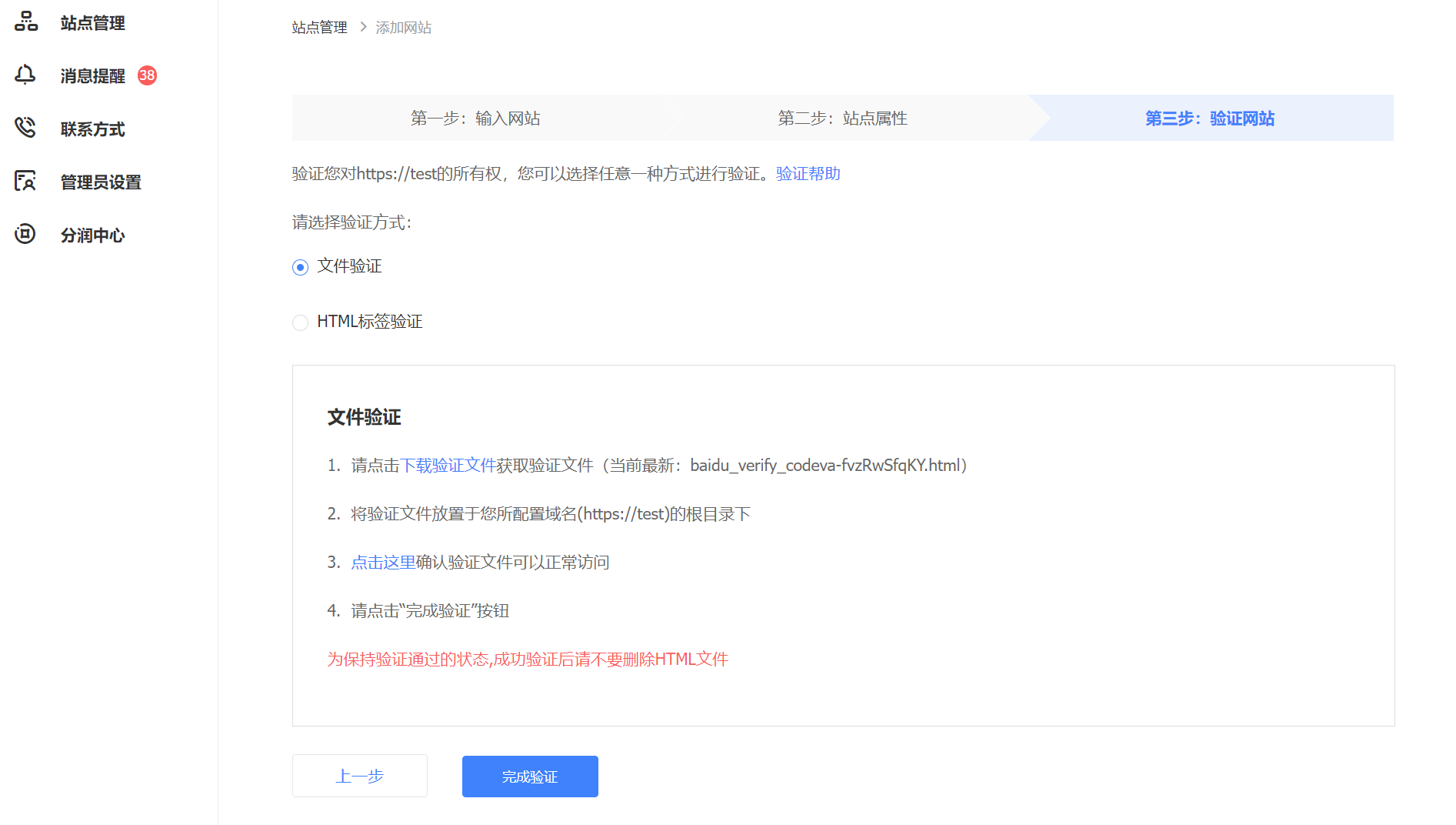
  • 添加站点

    站点管理 > 添加站点 > 验证站点所有权(可能大概需要1天的时间)

    image-20240210022100732

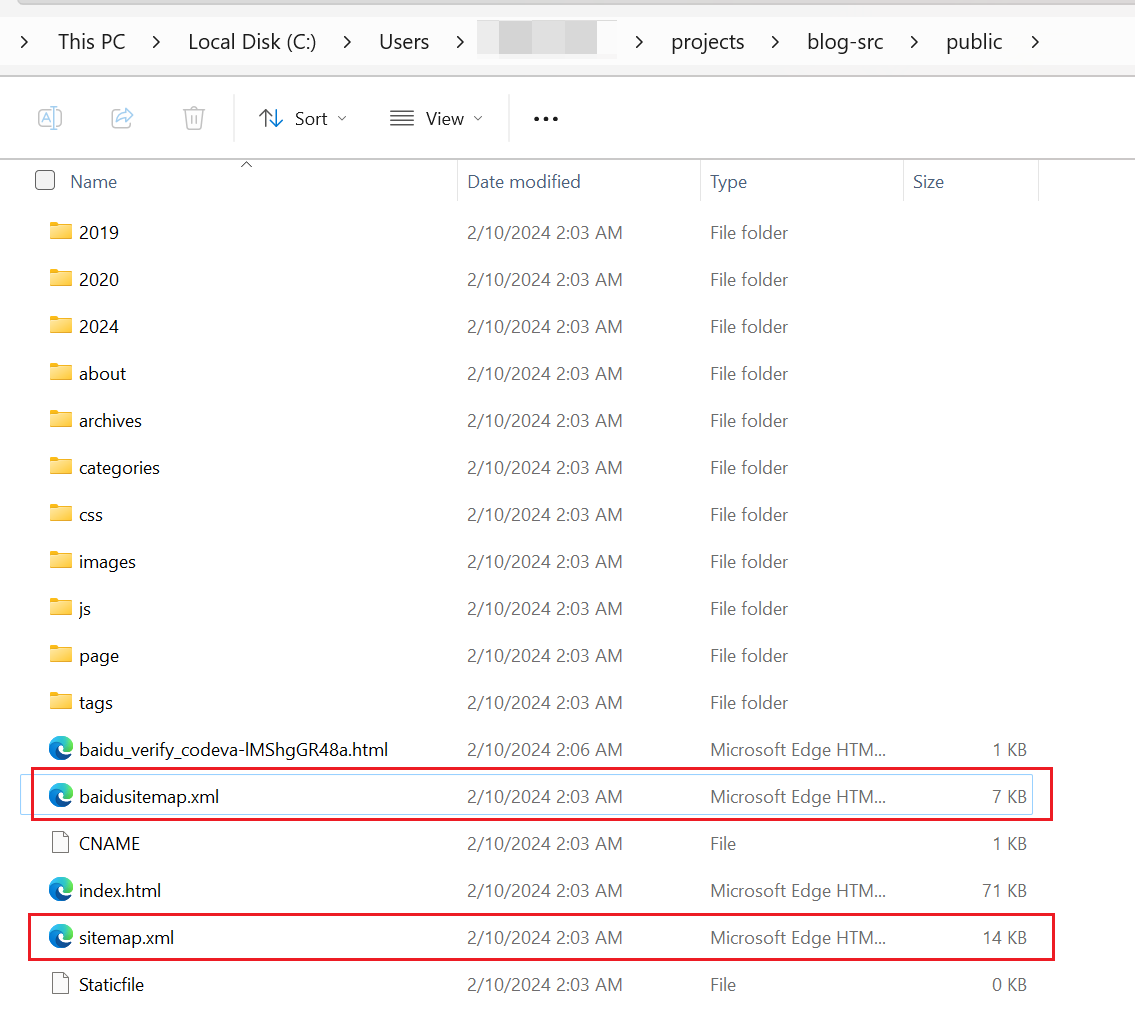
    文件验证的方式:将验证文件放到hexo的public文件夹,即上传github.io项目的根目录。

    但hexo clean后public文件夹里面的验证文件消失了怎么办?

    :exclamation: 整个public文件夹是执行hexo g后生成的,若执行hexo clean会把整个public连同CNAME文件夹删掉。应该把需要在根目录保留的文件存放在source文件夹下,在执行hexo g命令时,其会把source文件夹下的文件原原本本地复制到public文件夹下,这样文件就不会丢失了。

  • 资源收录

    • 生成Sitemap

      使用npm插件自动生成网站sitemap,命令执行完后,根目录会根据配置文件的域名生成sitemap文件;

      1
      2
      $ npm install hexo-generator-sitemap --save
      $ npm install hexo-generator-baidu-sitemap --save
      image-20240210023928549
    • 资源提交

      效率:主动推送>自动推送>Sitemap

      1. 主动推送
      2. 自动推送
      3. Sitemap提交

    Google

    doc: Google Search Central (formerly Webmasters) | Web SEO Resources | Google for Developers

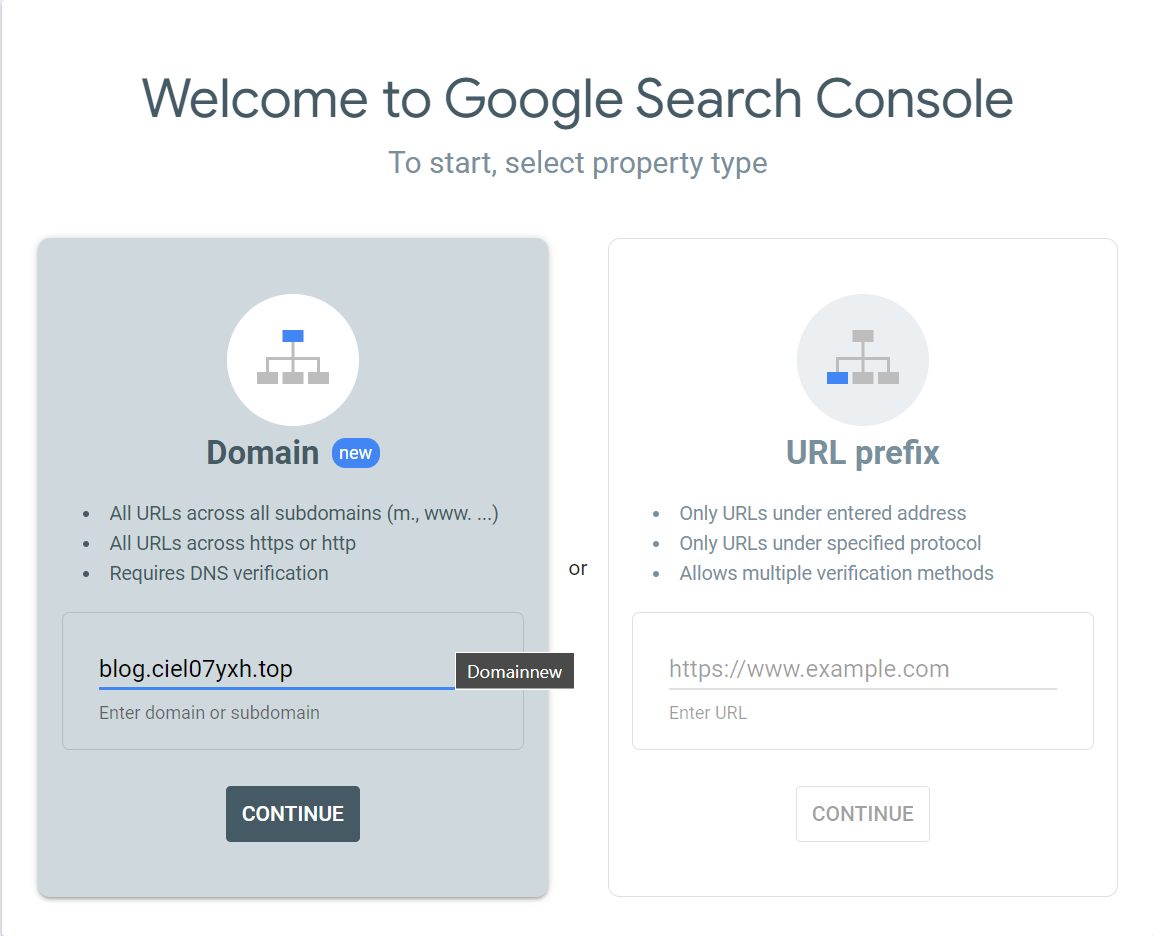
    谷歌站长工具:Google Search Console

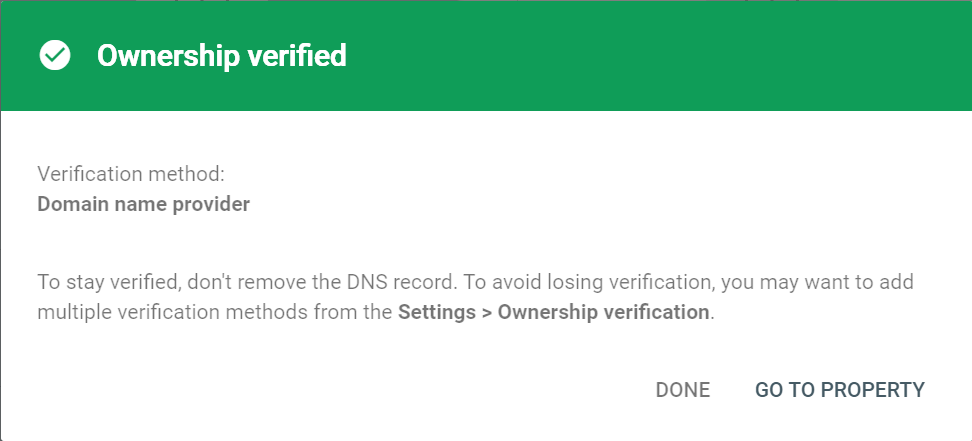
    验证网站所有权

    image-20240210231705045

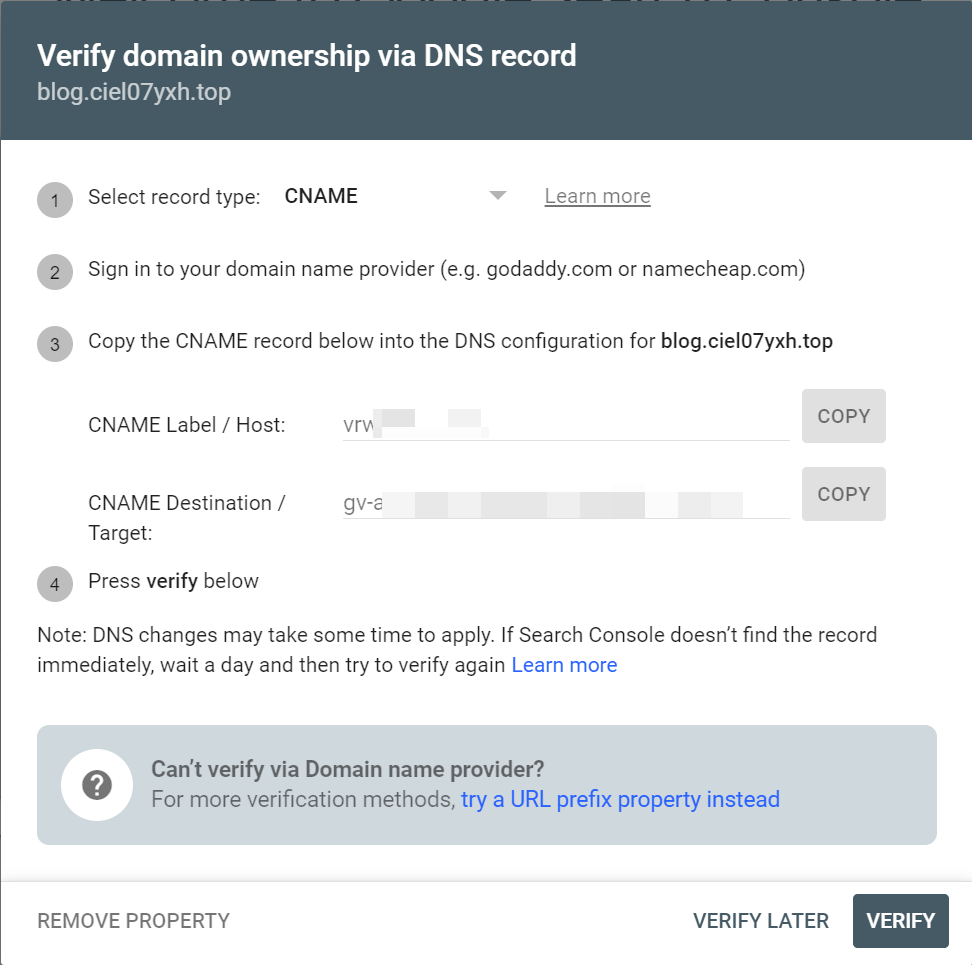
    可以使用添加TXT或者CNAME记录的方式验证

    image-20240210232214920

​ 子域名不知道为什么验证失败,换成域名ciel07yxh.top后成功

image-20240210232641098

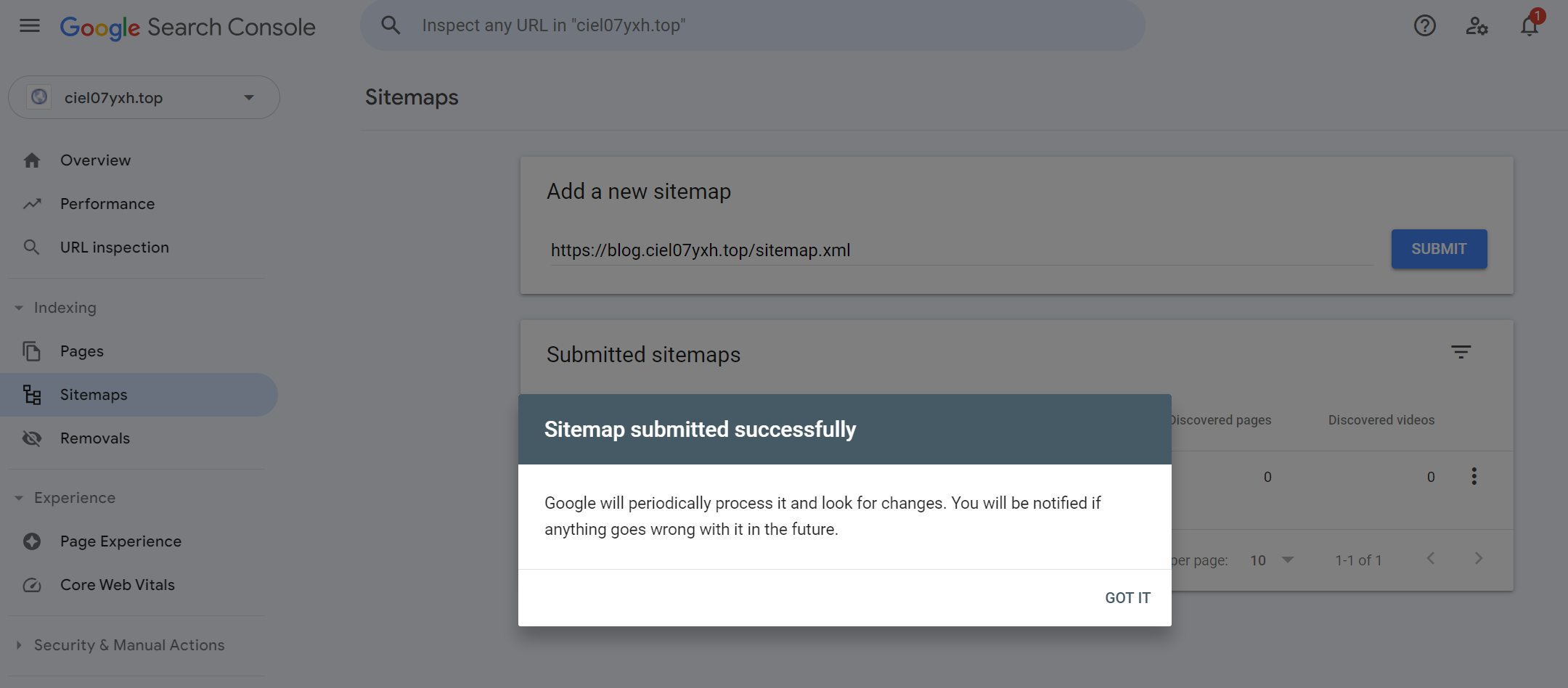
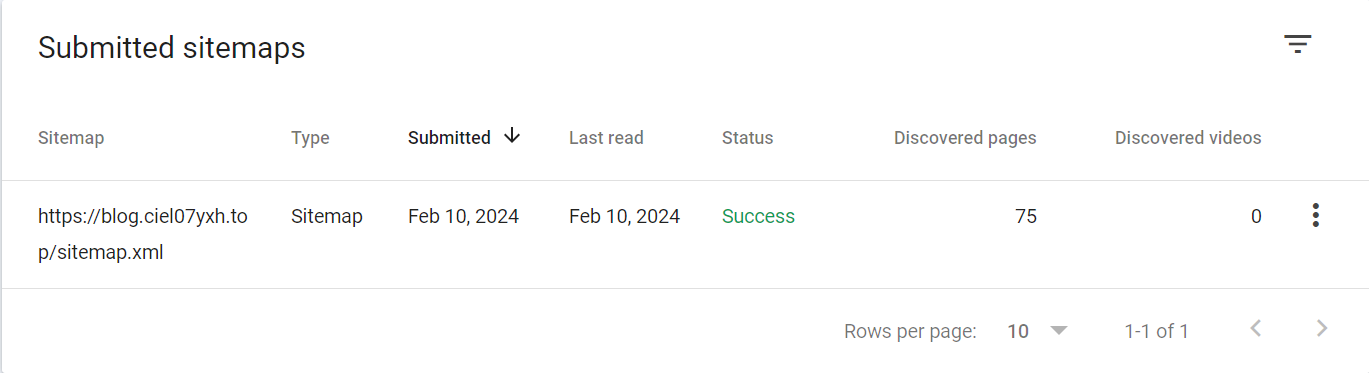
提交Sitemap

image-20240210232903680

image-20240210233020711

General description

  1. 为AKS集群使能Azure Key Vault Provider for Secrets Store CSI Driver

    参考: Use the Azure Key Vault Provider for Secrets Store CSI Driver for Azure Kubernetes Service (AKS) secrets - Azure Kubernetes Service | Microsoft Learn

  2. 配置使用Microsoft Entra Workload IDuser-assigned managed identity的方式从KV获取资源

    参考:Provide an access identity to the Azure Key Vault Provider for Secrets Store CSI Driver for Azure Kubernetes Service (AKS) secrets - Azure Kubernetes Service |Microsoft Learn

  3. 部署SecretProviderClass资源将KV中证书资源mount,并同步到集群secretObject

    参考:Sync mounted content with a Kubernetes secretDeploy a SecretProviderClass

  4. 配置Nginx Ingress使用secretObject

    参考:Set up Secrets Store CSI Driver to enable NGINX Ingress Controller with TLS on Azure Kubernetes Service (AKS) - Azure Kubernetes Service | Microsoft Learn

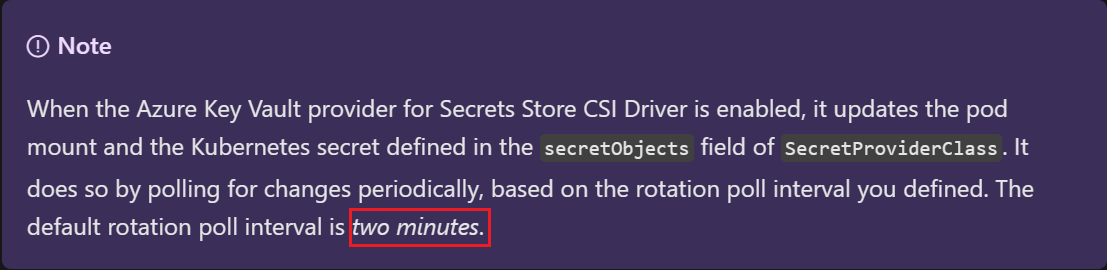
  5. 如果需要确保mount到Pod的资源可以自动更新,您需要手动使能autorotation;默认情况下,集群从KV中pull数据的间隔为2min,也可以自定义该时间间隔

    参考:Enable and disable autorotation

  6. 另外请注意,上述autorotation的开启只能保证secret的自动更新,应用侧需要主动监测volume等的变化以达到热更新。【经测试,IngressNginx不需要Reloader也可以自动更新cert】

Detailed steps

  1. 创建好AKS集群以及kv资源

  2. 为AKS集群使能Azure Key Vault Provider for Secrets Store CSI Driver

    参考: Use the Azure Key Vault Provider for Secrets Store CSI Driver for Azure Kubernetes Service (AKS) secrets - Azure Kubernetes Service | Microsoft Learn

    1
    2
    3
    4
    5
    6
    7
    # enable addon:
    az aks enable-addons --addons azure-keyvault-secrets-provider --name csiaks --resource-group csiaks
    # verification
    [ciel@centos ~]$ kubectl get pods -n kube-system -l 'app in (secrets-store-csi-driver,secrets-store-provider-azure)'
    NAME READY STATUS RESTARTS AGE
    aks-secrets-store-csi-driver-h7dzx 3/3 Running 0 139m
    aks-secrets-store-provider-azure-2842p 1/1 Running 0 139m
  3. 配置使用Microsoft Entra Workload ID或user-assigned managed identity的方式从KV获取资源,并验证

    参考:Access with a user-assigned managed identity

    a. 可以使用启用addon时候默认创建的managed identity也可以重新创建一个,这里使用现有的
    Access your key vault using the az aks show command and the user-assigned managed identity created by the add-on when you enabled the Azure Key Vault provider for Secrets Store CSI Driver on your AKS Cluster.

    1
    2
    [ciel@centos ~]$ az aks show -g csiaks -n csiaks --query addonProfiles.azureKeyvaultSecretsProvider.identity.clientId -o tsv
    The behavior of this command has been altered by the following extension: aks-preview

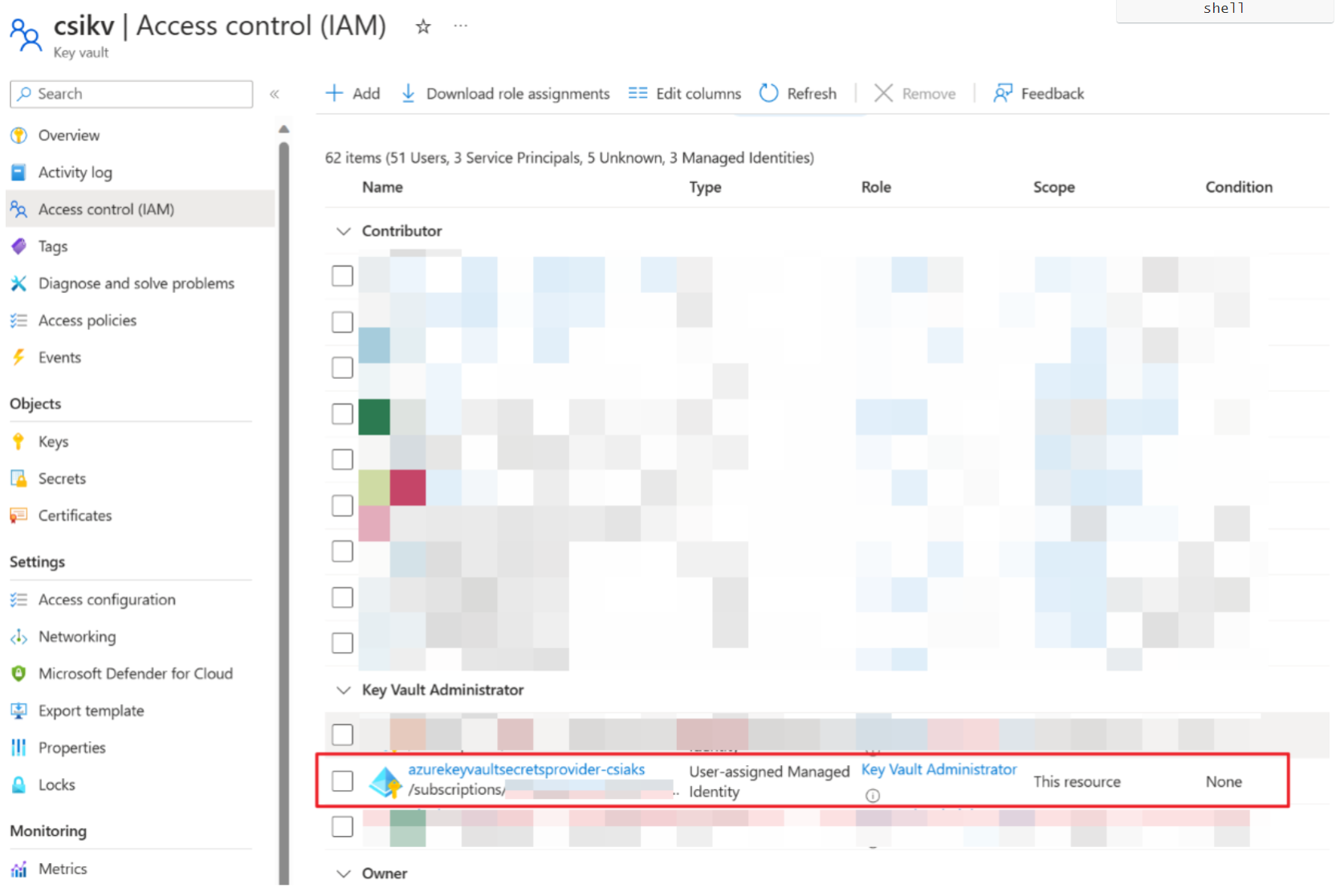
    b. 给identity授权访问KV (”Key Vault Administrator” role)

    1
    2
    3
    4
    export IDENTITY_CLIENT_ID="$(az identity show -g MC_csiaks_csiaks_chinanorth2 --name azurekeyvaultsecretsprovider-csiaks --query 'clientId' -o tsv)"
    export KEYVAULT_SCOPE=$(az keyvault show --name csikv --query id -o tsv)

    az role assignment create --role "Key Vault Administrator" --assignee f007248d-890f-4ba2-943b-8xxxxxxde6 --scope $KEYVAULT_SCOPE![image-20240128001750051](Nginx-ingress-cert-auto-rotation-with-kv-integration/image-20240128001750051.png)

    ​ 文档中步骤3-5创建了SecretProviderClass和一个busybox的pod,校验获取secret是否能成功 [先在对应的kv中创建secret1和key1]

    k apply -f secretproviderclass.yml

    1
    2
    3
    4
    5
    6
    7
    8
    9
    10
    11
    12
    13
    14
    15
    16
    17
    18
    19
    20
    21
    22
    23
    24
    25
    26
    27
    # This is a SecretProviderClass example using user-assigned identity to access your key vault
    apiVersion: secrets-store.csi.x-k8s.io/v1
    kind: SecretProviderClass
    metadata:
    name: azure-kvname-user-msi
    spec:
    provider: azure
    parameters:
    usePodIdentity: "false"
    useVMManagedIdentity: "true" # Set to true for using managed identity
    userAssignedIdentityID: xxxxxxxx-xxxx-xxxx-xxxx-xxxxxxxxxx # Set the clientID of the user-assigned managed identity to use
    keyvaultName: csikv # Set to the name of your key vault
    cloudName: "AzureChinaCloud" # [OPTIONAL for Azure] if not provided, the Azure environment defaults to AzurePublicCloud
    objects: |
    array:
    - |
    objectName: secret1
    objectType: secret # object types: secret, key, or cert
    objectVersion: "" # [OPTIONAL] object versions, default to latest if empty
    - |
    objectName: key1
    objectType: key

    objectVersion: ""
    tenantId: xxxxxxxx-xxxx-xxxx-xxxx-xxxxxxxxxx # The tenant ID of the key vault
    ~

    k apply -f pod.yml

    1
    2
    3
    4
    5
    6
    7
    8
    9
    10
    11
    12
    13
    14
    15
    16
    17
    18
    19
    20
    21
    22
    23
    24
    # This is a sample pod definition for using SecretProviderClass and the user-assigned identity to access your key vault
    kind: Pod
    apiVersion: v1
    metadata:
    name: busybox-secrets-store-inline-user-msi
    spec:
    containers:
    - name: busybox
    image: k8sgcr.azk8s.cn/e2e-test-images/busybox:1.29-4
    command:
    - "/bin/sleep"
    - "10000"
    volumeMounts:
    - name: secrets-store01-inline
    mountPath: "/mnt/secrets-store"
    readOnly: true
    volumes:
    - name: secrets-store01-inline
    csi:
    driver: secrets-store.csi.k8s.io
    readOnly: true
    volumeAttributes:
    secretProviderClass: "azure-kvname-user-msi"

    verification

    1
    2
    kubectl exec busybox-secrets-store-inline-user-msi -- ls /mnt/secrets-store/
    kubectl exec busybox-secrets-store-inline-user-msi -- cat /mnt/secrets-store/secret1
    image-20240128002745041
  4. 正题:配置Nginx Ingress使用KV中的证书 [文档中有Bind certificate to application以及Bind certificate to ingress controller两种,应该分别对应配置后端应用证书以及Ingress前端证书;此处lab的是在ingress controller配置ingress前端证书]

    参考: Set up Secrets Store CSI Driver to enable NGINX Ingress Controller with TLS on Azure Kubernetes Service (AKS) - Azure Kubernetes Service | Microsoft Learn

    a. 创建并上传证书

    1
    2
    3
    4
    5
    6
    7
    8
    9
    10
    11
    # Generate a TLS certificate
    export CERT_NAME=aks-ingress-cert
    openssl req -x509 -nodes -days 365 -newkey rsa:2048 \
    -out aks-ingress-tls.crt \
    -keyout aks-ingress-tls.key \
    -subj "/CN=demo.azure.com/O=aks-ingress-tls"
    # Import the certificate to AKV
    export AKV_NAME="[YOUR AKV NAME]"
    openssl pkcs12 -export -in aks-ingress-tls.crt -inkey aks-ingress-tls.key -out $CERT_NAME.pfx
    # skip Password prompt
    az keyvault certificate import --vault-name $AKV_NAME -n $CERT_NAME -f $CERT_NAME.pfx

    b. Deploy a SecretProviderClass

    1
    2
    export NAMESPACE=ingress-basic
    kubectl create namespace $NAMESPACE

    kubectl apply -f SPC1026.yaml -n $NAMESPACE

    1
    2
    3
    4
    5
    6
    7
    8
    9
    10
    11
    12
    13
    14
    15
    16
    17
    18
    19
    20
    21
    22
    23
    24
    25
    26
    27
    apiVersion: secrets-store.csi.x-k8s.io/v1
    kind: SecretProviderClass
    metadata:
    name: azure-tls
    spec:
    provider: azure
    secretObjects: # secretObjects defines the desired state of synced K8s secret objects
    - secretName: ingress-tls-csi
    type: kubernetes.io/tls
    data:
    - objectName: aks-ingress-cert
    key: tls.key
    - objectName: aks-ingress-cert
    key: tls.crt
    parameters:
    usePodIdentity: "false"
    useVMManagedIdentity: "true"
    userAssignedIdentityID: xxxxxxxx-xxxx-xxxx-xxxx-xxxxxxxxxx
    keyvaultName: csikv # the name of the AKV instance
    cloudName: "AzureChinaCloud"
    objects: |
    array:
    - |
    objectName: aks-ingress-cert
    objectType: secret
    tenantId: xxxxxxxx-xxxx-xxxx-xxxx-xxxxxxxxxx # the tenant ID of the AKV instance

    image-20240128003234400

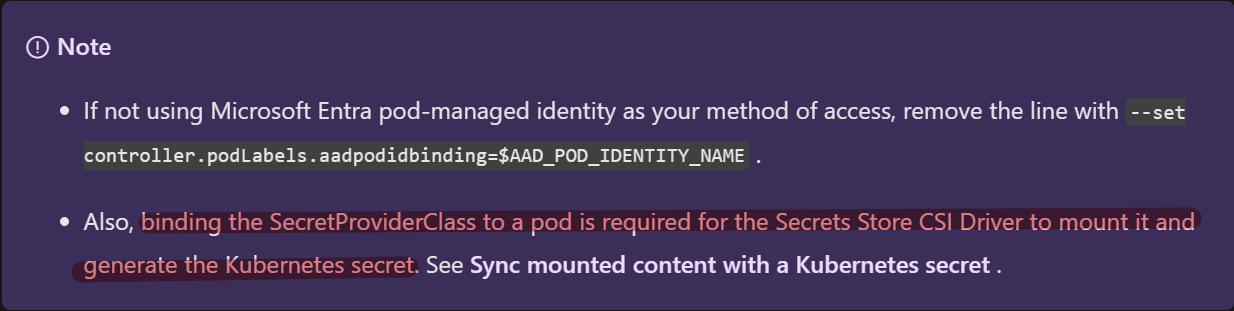
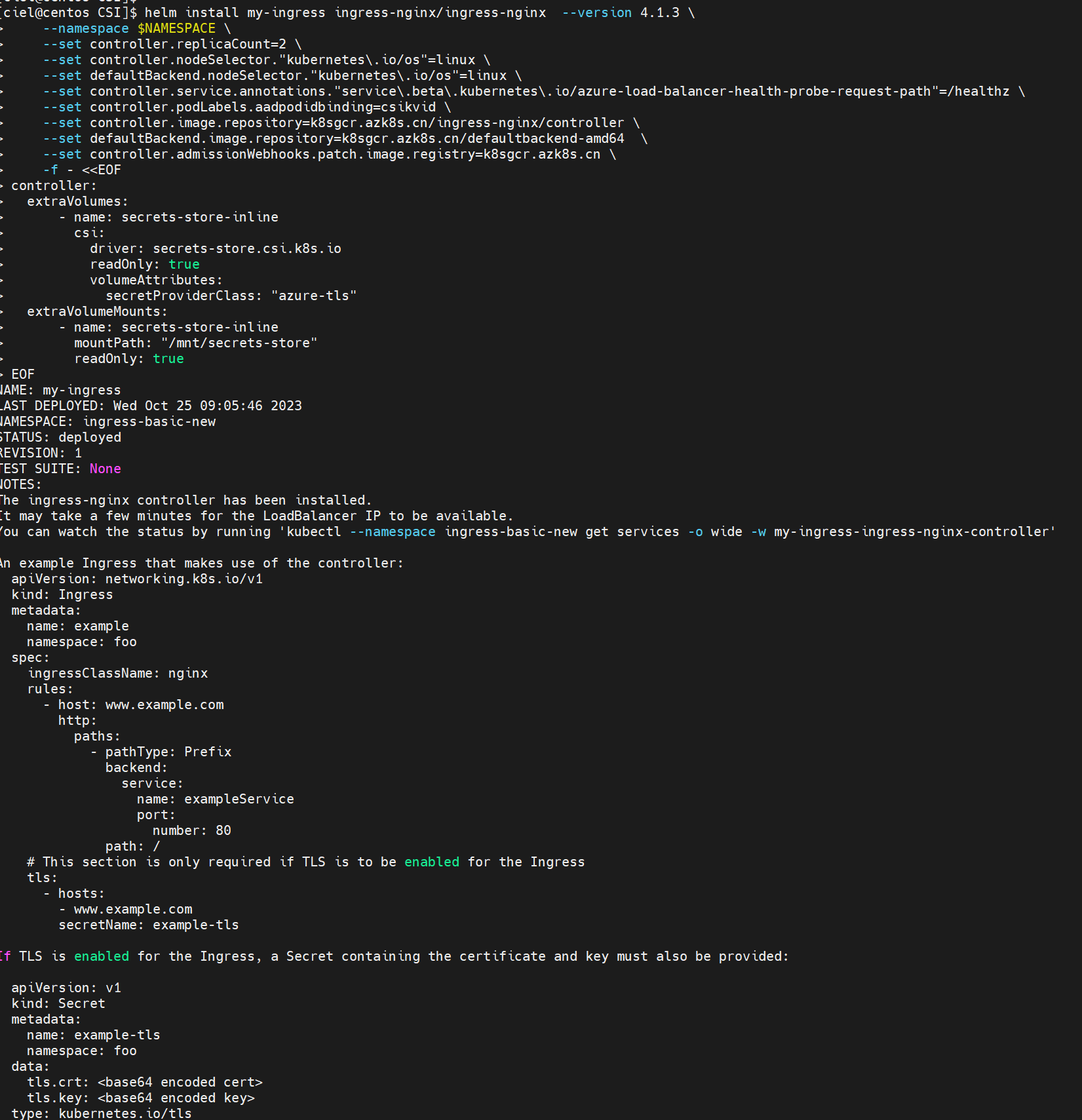
c. Deploy the ingress controller –> check Bind certificate to ingress controller section

1
2
3
4
5
6
7
8
9
10
11
12
13
14
15
16
17
18
19
20
21
22
23
helm install my-ingress ingress-nginx/ingress-nginx  --version 4.1.3 \
--namespace $NAMESPACE \
--set controller.replicaCount=2 \
--set controller.nodeSelector."kubernetes\.io/os"=linux \
--set defaultBackend.nodeSelector."kubernetes\.io/os"=linux \
--set controller.service.annotations."service\.beta\.kubernetes\.io/azure-load-balancer-health-probe-request-path"=/healthz \
--set controller.image.repository=k8sgcr.azk8s.cn/ingress-nginx/controller \
--set defaultBackend.image.repository=k8sgcr.azk8s.cn/defaultbackend-amd64 \
--set controller.admissionWebhooks.patch.image.registry=k8sgcr.azk8s.cn \
-f - <<EOF
controller:
extraVolumes:
- name: secrets-store-inline
csi:
driver: secrets-store.csi.k8s.io
readOnly: true
volumeAttributes:
secretProviderClass: "azure-tls"
extraVolumeMounts:
- name: secrets-store-inline
mountPath: "/mnt/secrets-store"
readOnly: true
EOF

image-20240128003403340

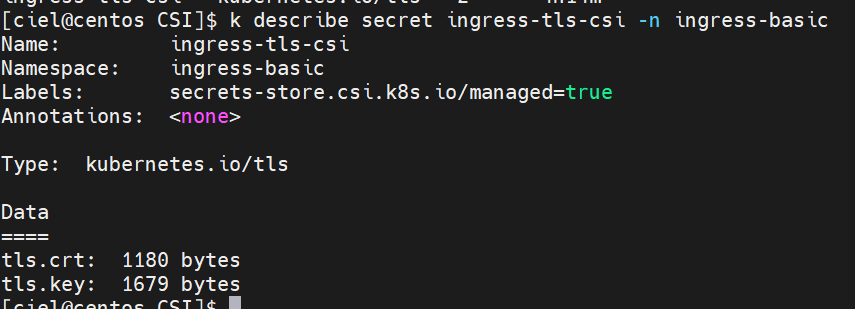
Ingress controller Pod 创建好之后就可以在集群里看到Secret啦

image-20240128003417852 image-20240128003431160

d. Deploy the application –> Deploy the application using an ingress controller reference [文档里面yaml格式空格有点儿问题]

kubectl apply - f aks-helloworld-one . yaml - n $NAMESPACE

1
2
3
4
5
6
7
8
9
10
11
12
13
14
15
16
17
18
19
20
21
22
23
24
25
26
27
28
29
30
31
32
33
apiVersion: apps/v1
kind: Deployment
metadata:
name: aks-helloworld-one
spec:
replicas: 1
selector:
matchLabels:
app: aks-helloworld-one
template:
metadata:
labels:
app: aks-helloworld-one
spec:
containers:
- name: aks-helloworld-one
image: mcr.microsoft.com/azuredocs/aks-helloworld:v1
ports:
- containerPort: 80
env:
- name: TITLE
value: "Welcome to Azure Kubernetes Service (AKS)"
---
apiVersion: v1
kind: Service
metadata:
name: aks-helloworld-one
spec:
type: ClusterIP
ports:
- port: 80
selector:
app: aks-helloworld-one

kubectl apply - f aks-helloworld-two . yaml - n $NAMESPACE

1
2
3
4
5
6
7
8
9
10
11
12
13
14
15
16
17
18
19
20
21
22
23
24
25
26
27
28
29
30
31
32
33
apiVersion: apps/v1
kind: Deployment
metadata:
name: aks-helloworld-two
spec:
replicas: 1
selector:
matchLabels:
app: aks-helloworld-two
template:
metadata:
labels:
app: aks-helloworld-two
spec:
containers:
- name: aks-helloworld-two
image: mcr.microsoft.com/azuredocs/aks-helloworld:v1
ports:
- containerPort: 80
env:
- name: TITLE
value: "AKS Ingress Demo"
---
apiVersion: v1
kind: Service
metadata:
name: aks-helloworld-two
spec:
type: ClusterIP
ports:
- port: 80
selector:
app: aks-helloworld-two

e. Deploy an ingress resource referencing the secret

*kubectl apply **-f hello-world-ingress.**yaml **-*n $NAMESPACE

1
2
3
4
5
6
7
8
9
10
11
12
13
14
15
16
17
18
19
20
21
22
23
24
25
26
27
28
29
30
31
32
33
34
35
36
37
apiVersion: networking.k8s.io/v1
kind: Ingress
metadata:
name: ingress-tls
annotations:
nginx.ingress.kubernetes.io/rewrite-target: /$2
spec:
ingressClassName: nginx
tls:
- hosts:
- demo.azure.com
secretName: ingress-tls-csi
rules:
- host: demo.azure.com
http:
paths:
- path: /hello-world-one(/|$)(.*)
pathType: Prefix
backend:
service:
name: aks-helloworld-one
port:
number: 80
- path: /hello-world-two(/|$)(.*)
pathType: Prefix
backend:
service:
name: aks-helloworld-two
port:
number: 80
- path: /(.*)
pathType: Prefix
backend:
service:
name: aks-helloworld-one
port:
number: 80

verification

1
2
3
4
[ciel@centos CSI]$ kubectl get service --namespace $NAMESPACE --selector app.kubernetes.io/name=ingress-nginx
NAME TYPE CLUSTER-IP EXTERNAL-IP PORT(S) AGE
my-ingress-ingress-nginx-controller LoadBalancer 10.0.58.216 40.xx.xx.228 80:30141/TCP,443:30810/TCP 4h14m
my-ingress-ingress-nginx-controller-admission ClusterIP 10.0.74.140 <none> 443/TCP
1
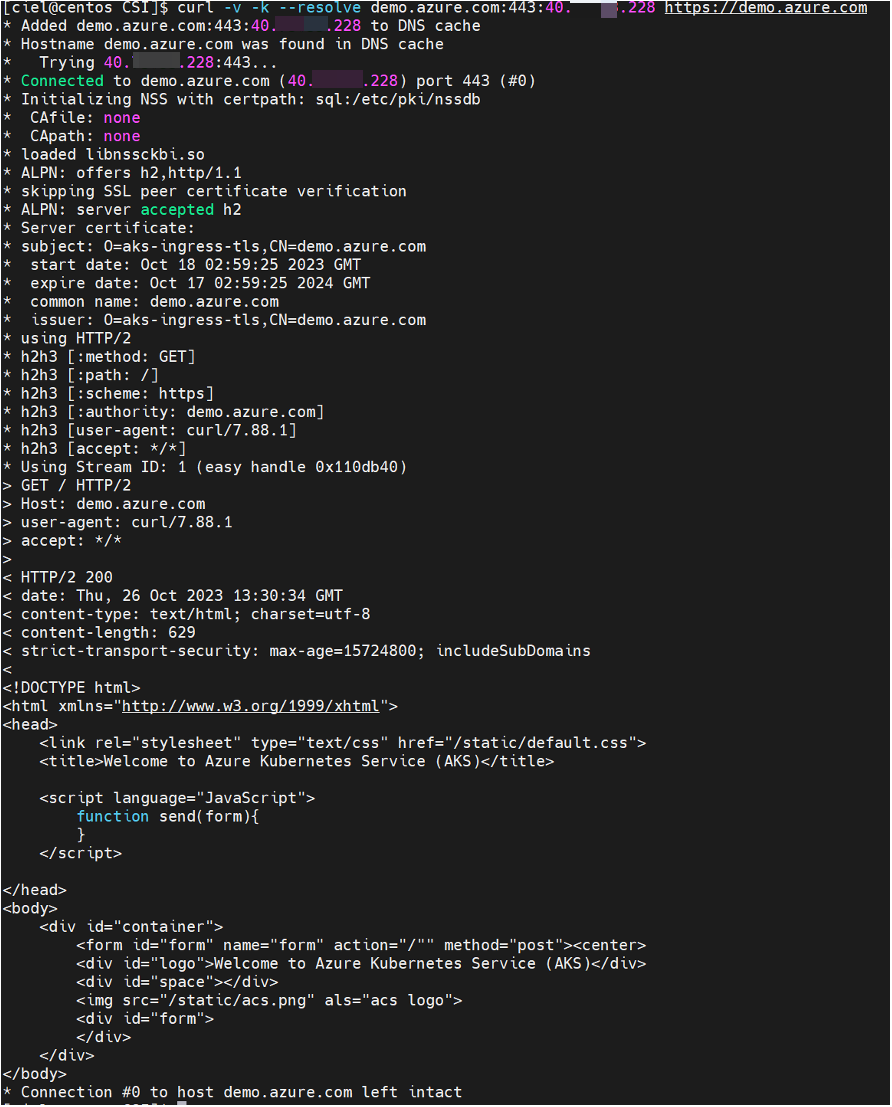
curl -v -k --resolve demo.azure.com:443:40.73.33.228 https://demo.azure.com
image-20240128003838719
  1. 如果需要确保mount到Pod的资源可以自动更新,需要手动使能autorotation;默认情况下,集群从KV中pull数据的间隔为2min,也可以自定义该时间间隔

    参考:Enable and disable autorotation

    1
    az aks addon update  -n csiaks -g csiaks -a azure-keyvault-secrets-provider --enable-secret-rotation
    image-20240128003944426 image-20240128003956429
  2. 另外请注意,上述autorotation的开启只能保证secret的自动更新,应用侧需要主动监测volume等的变化以达到热更新。
    [经测试,Ingress Nginx不需要Reloader也可以自动更新cert]

    image-20240128004638863

0%