Ciel's blog

Hi, this is Ciel!

1295. Find Numbers with Even Number of Digits

题目

Given an array nums of integers, return how many of them contain an even number of digits.

Example 1:

1
2
3
4
5
6
7
8
9
Input: nums = [12,345,2,6,7896]
Output: 2
Explanation:
12 contains 2 digits (even number of digits).
345 contains 3 digits (odd number of digits).
2 contains 1 digit (odd number of digits).
6 contains 1 digit (odd number of digits).
7896 contains 4 digits (even number of digits).
Therefore only 12 and 7896 contain an even number of digits.

Example 2:

1
2
3
4
Input: nums = [555,901,482,1771]
Output: 1
Explanation:
Only 1771 contains an even number of digits

Constraints:

  • 1 <= nums.length <= 500
  • 1 <= nums[i] <= 10^5

解题

思路:题目的关键点在于如何计数一个整数的位数。Hint给出的方法是:Divide the number by 10 again and again to get the number of digits。我想到的是把整数转化为string类型,因为python种字符串类型是可迭代的,可以直接用len()计数位数。

我的代码:

1
2
3
4
5
6
7
class Solution(object):
def findNumbers(self, nums):
sum = 0
for num in nums:
if len(str(num))%2 == 0:
sum += 1
return sum

别人更简洁的代码:

1
2
3
class Solution(object):
def findNumbers(self, nums):
return sum(len(str(n)) % 2 == 0 for n in nums)

但是虽然第二种代码更简洁,但似乎时空复杂度是差不多的。

总结

  1. sum函数

    1
    sum(iterable[, start])
  • iterable – 可迭代对象,如:列表、元组、集合。
  • start – 指定相加的参数,如果没有设置这个值,默认为0。

经常看见一些简单的代码是用了sum函数求和生成器

此处遍历了nums,判断有几个元素的len(str(n)) % 2 == 0结果为True

711. Jewels and Stones

题目

You’re given strings J representing the types of stones that are jewels, and S representing the stones you have. Each character in S is a type of stone you have. You want to know how many of the stones you have are also jewels.

The letters in J are guaranteed distinct, and all characters in J and S are letters. Letters are case sensitive, so "a" is considered a different type of stone from "A".

Example 1:

1
2
Input: J = "aA", S = "aAAbbbb"
Output: 3

Example 2:

1
2
Input: J = "z", S = "ZZ"
Output: 0

Note:

  • S and J will consist of letters and have length at most 50.
  • The characters in J are distinct.

解题

思路:从字符中查找字符串。最开始想到的是将J中的字符串分解,然后依次在S中查找,发现要用两个for循环,复杂度太高,就在想怎么只用一个循环,就想到了count方法。

1
2
3
4
5
6
7
8
9
10
11
12
13
14
class Solution(object):
def numJewelsInStones(self, J, S):
"""
:type J: str
:type S: str
:rtype: int
"""
sum = 0
for j in J:
count = S.count(j)
sum += count
return sum
# Runtime: 12 ms
# Memory Usage: 11.9 MB

从答案中找到了一些很简洁的解决办法:

1
2
3
4
5
6
7
8
9
def numJewelsInStones(self, J, S):
return sum(map(J.count, S))
def numJewelsInStones(self, J, S):
return sum(map(S.count, J))
def numJewelsInStones(self, J, S):
return sum(s in J for s in S)
def numJewelsInStones(self, J, S):
J = set(J)
return sum([1 for stone in S if stone in J])

但是似乎运行时间和内存占用比不比我第一次提交的代码小。

总结

  1. 代码的简洁度固然重要,但是Time and space complexity(时空复杂度)应该排在第一位。
  2. map函数
1
map(function, iterable, ...)

map() 会根据提供的函数对指定序列做映射。第一个参数 function 以参数序列中的每一个元素调用 function 函数,返回包含每次 function 函数返回值的新列表。

  1. count函数
1
str.count(sub, start= 0,end=len(string))
  • sub – 搜索的子字符串
  • start – 字符串开始搜索的位置。默认为第一个字符,第一个字符索引值为0。
  • end – 字符串中结束搜索的位置。字符中第一个字符的索引为 0。默认为字符串的最后一个位置。

注意:c

1
2
3
4
>>> st1 = "ADA"
>>> st2 = "ADADADA"
>>> st2.count(st1)
2
  1. Python中函数带括号和不带括号的区别
  • 不带括号时,调用的是这个函数本身 ,是整个函数体,是一个函数对象,不需等该函数执行完成
  • 带括号时(此时必须传入需要的参数),调用的是函数的return结果,需要等待函数执行完成的结果

所以:

map(J.count, S)map(S.count, J)分别代表在J中查找S中的元素的个数和在S中查找J中元素的个数。

  1. sum(s in J for s in S)使用了生成器(genexps),将S中的原色进行了过滤,对S中的元素依次判断它是否在J中。

References

Python中函数带括号和不带括号的区别

NS3安装

最开始按照同学的blog进行安装:

安装依赖库

  • 更新apt
1
sudo apt-get update
  • 安装相关依赖
1
2
3
4
5
6
7
8
9
10
11
12
13
14
15
16
17
18
19
20
21
22
23
24
25
26
27
28
29
30
31
32
33
34
35
36
37
38
39
40
41
42
43
44
sudo apt-get install gcc g++ python python-dev  #C++和python

sudo apt-get install mercurial #NS3代码维护使用的源码版本控制管理系统
sudo apt-get install qt5-default mercurial

sudo apt-get install bzr #运行python绑定ns-3-dev需要bazaar这个组件
sudo apt-get install autoconf cvs unrar

sudo apt-get install gdb valgrind #调试工具

sudo apt-get install gsl-bin libgsl-dev libgsl23 libgslcblas0 #支持更多精确WIFI模块的GNU Scientific Library (GSL)

sudo apt-get install flex bison libfl-dev #仿真必需的词法分析器和语法分析生成器

sudo apt-get install g++-3.4 gcc-3.4 #Network Simulation Cradle (nsc) stacks需要gcc-3.4

sudo apt-get install tcpdump #读取pcap的packet traces

sudo apt-get install sqlite sqlite3 libsqlite3-dev #支持统计特性的数据库软件

sudo apt-get install libxml2 libxml2-dev #xml的配置存储软件

sudo apt-get install libgtk2.0-0 libgtk2.0-dev #基于GTK的配置系统

sudo apt-get install vtun lxc #在虚拟机and ns-3上测试

sudo apt-get install uncrustify #代码风格检查程序

sudo apt-get install doxygen graphviz imagemagick #文档生成器

sudo apt-get install texlive texlive-extra-utils texlive-latex-extra texlive-font-utils texlive-lang-portuguese dvipng latexmk

sudo apt-get install python-sphinx dia

sudo apt-get install python-pygraphviz python-kiwi python-pygoocanvas libgoocanvas-dev #Gustavo’s ns-3-pyviz的可视化软件

sudo apt-get install libboost-signals-dev libboost-filesystem-dev #支持openflow 模块

sudo apt-get install openmpi-bin openmpi-common openmpi-doc libopenmpi-dev #支持基于MPI的分布式仿真

sudo apt-get install gir1.2-goocanvas-2.0 python-gi python-gi-cairo python-pygraphviz python3-gi python3-gi-cairo python3-pygraphviz gir1.2-gtk-3.0 ipython ipython3

sudo apt-get install cmake libc6-dev libc6-dev-i386 libclang-dev llvm-dev automake pip
sudo pip install cxxfilt

在安装依赖的时候遇到一两个错误,根据提示进行了包的替换,有的则直接略过了,等到以后需要的时候再装。

安装NS3

  • 安装NS3包括创建目录、进入目录、下载压缩包、解压
1
wget http://www.nsnam.org/release/ns-allinone-3.28.tar.bz2tar xjf ns-allinone-3.28.tar.bz2

编译NS3

  • 进入ns-allinone-3.28目录:

    1
    ./build.py
  • 进入ns-3.28目录:

    1
    ./waf distclean #清除整个build目录./waf configure --build-profile=debug --enable-examples --enable-tests #打开debug并开启例子及帮助./waf build

测试并运行相关程序

1
./test.py -c core  #测试./waf --run hello-simulator  #运行hello-simulator程序

NS3配置

下载Eclipse

第一次在eclipse中配置Mercurial的时候提示出错:(具体见

1
Cannot complete the install because one or more required items could not be found. Software currently installed: MercurialEclipse 2.5.2.201806082050 (mercurialeclipse.feature.group 2.5.2.201806082050) Missing requirement: MercurialEclipse 2.5.2.201806082050 (com.vectrace.MercurialEclipse 2.5.2.201806082050) requires 'bundle org.eclipse.jface.text 3.11.0' but it could not be found Cannot satisfy dependency: From: MercurialEclipse 2.5.2.201806082050 (mercurialeclipse.feature.group 2.5.2.201806082050) To: com.vectrace.MercurialEclipse [2.5.2.201806082050]
原来是eclipse的版本问题,Mercurial在Eclipse Neon (4.6) 才第一次发布。

所以重新安装了Eclipse的最新版本,安装教程参考此文

导入项目

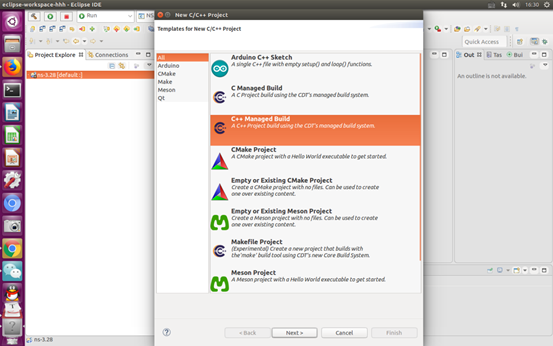
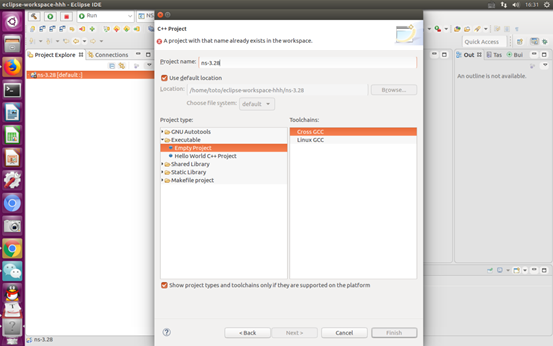
将NS3项目复制到eclipse的workspace,同时在eclipse中新建项目File--New--C/C++Projec, 项目名称与NS3项目名称相同。

image-20200103105339513

image-20200103105418681

用waf编译NS3项目

(不知道这一步是不是必要的)

在该项目中找到waf文件所在文件夹目录,在该目录中打开终端,依次敲以下命令。

1
2
3
./waf configure
./waf clean
./waf build

注:若显示无权限 则在以下界面打开终端,输入 sudo chmod 777 ns-XX —R

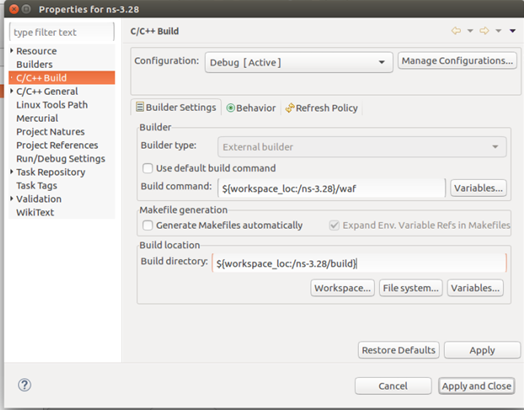
Eclipse 中 设置NS3 编译器为 waf

在 Project Explorer 中的 NS3 上单击右键,选择 properties,配置如图所示

image-20200103112510368

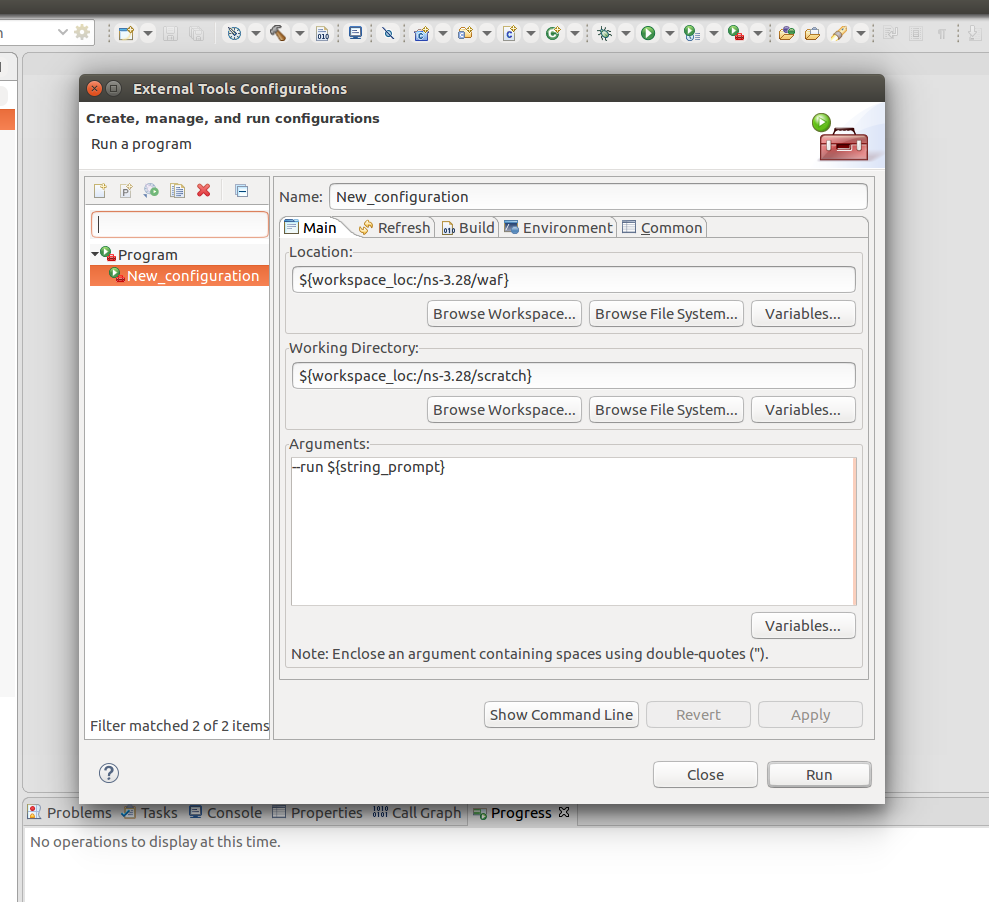
配置Eclipse 执行程序使用外部工具

Run->External Tools->External tools Configuration,配置如下

image-20200103111208090

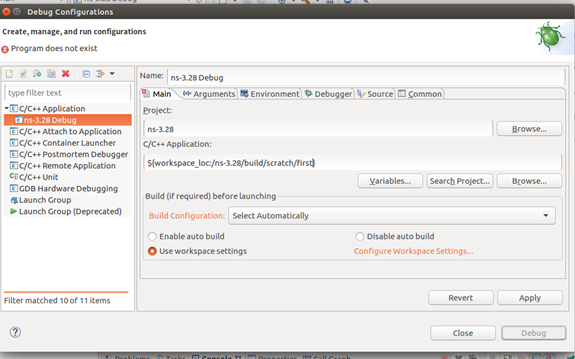
配置Debug

置Debug时 C/C++Application处的文件路径要精确到需要Debug的c++文件名

image-20200103112438631

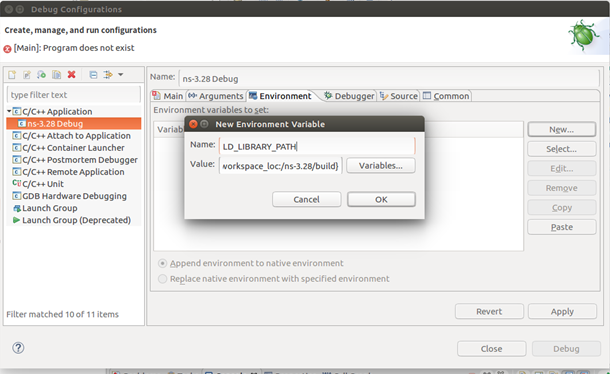
然后选择Environment 进行配置

image-20200103112429090

0%